First we need to download software that we’ll use to make usb bootable. Download Rufus here.
System Requirements to run Rufus:
Windows xp or later , support 32bit and 64bit .
After downloading Rufus , open it and it should look like this.
Make sure that your USB drive is plugged in

Now you need to import the iso file which you want to use, simply click to cd-rom button and choose the iso file.
1. Click to cd-rom button, and choose the iso file
2.Choose :
Standard Windows Installation: if you want to install windows using selected media , in this case your USB.
Windows to go : Is a feature that is enabled only in windows 8/8.1 and windows 10 , is a feature that lets you to boot any computer with it.
To create a normal bootable usb , choose “Standard Windows Installation”
3.Click "Start" and that's it
After that you can install Windows , using your own USB.
Thank you.
System Requirements to run Rufus:
Windows xp or later , support 32bit and 64bit .
After downloading Rufus , open it and it should look like this.
Make sure that your USB drive is plugged in
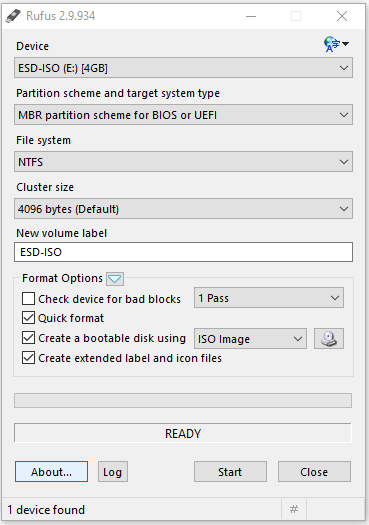
Now you need to import the iso file which you want to use, simply click to cd-rom button and choose the iso file.
1. Click to cd-rom button, and choose the iso file
2.Choose :
Standard Windows Installation: if you want to install windows using selected media , in this case your USB.
Windows to go : Is a feature that is enabled only in windows 8/8.1 and windows 10 , is a feature that lets you to boot any computer with it.
To create a normal bootable usb , choose “Standard Windows Installation”
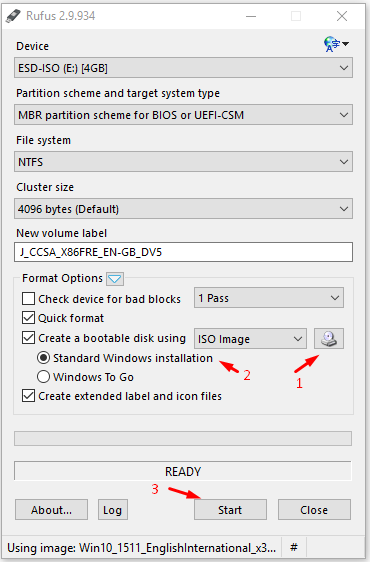
3.Click "Start" and that's it
After that you can install Windows , using your own USB.
Thank you.