Community Discussion

How can I edit my service after the theme has been changed in Seoclerks?

September 14, 2013
rajdwip Author Level 1

Write the reason you're deleting this FAQ

Thanks for your attention to my question. I couldn't edit my services that I have created before, I didn't get any option actually from the menu from where I can edit my service. Is it still possible to edit or modify my live service? Please let me know and I will appreciate detail explanations from other members who can do it. Please insert screenshots if needed. Thanks.
10

Comments 10

jkservice
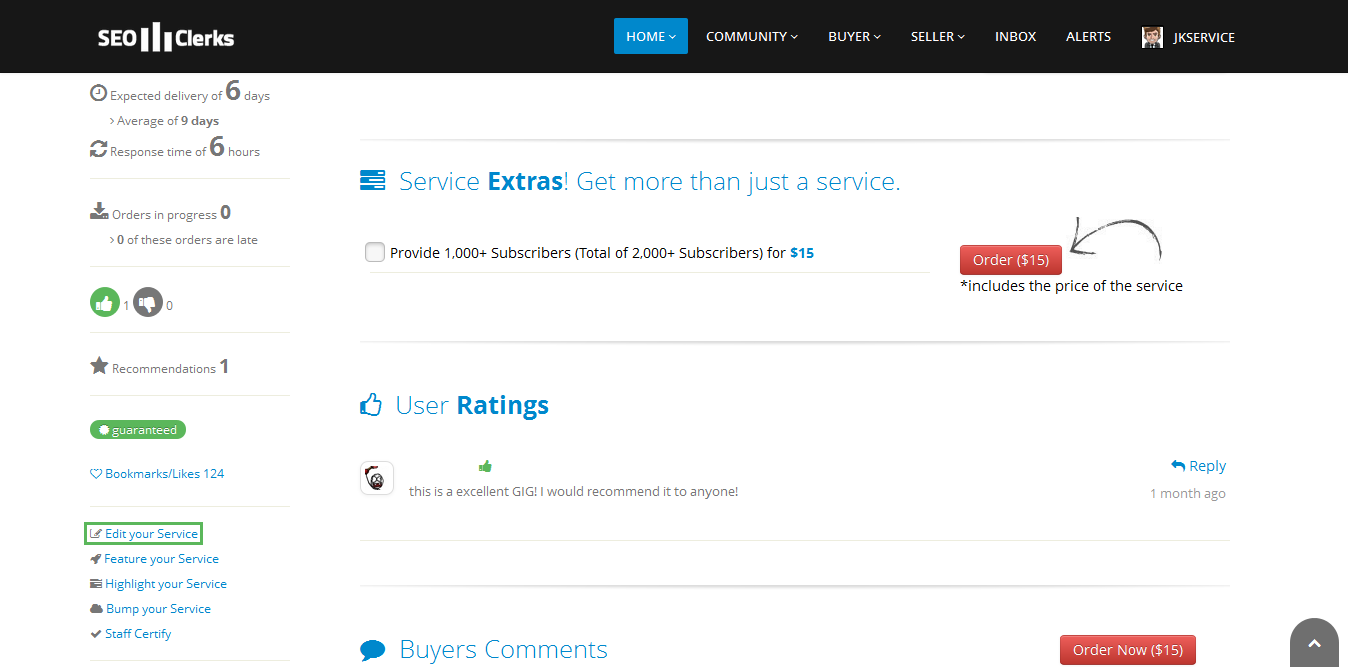
Hi, yes it's still possible to modify your live service. Click on the service you're wanting to edit, scroll down a bit, and on the left hand side, click "edit your service". Here is a screenshot below (edit your service is highlighted in green) of what it looks like or should look like on your side.

How can I edit my service after the theme has been changed in Seoclerks?

Enter a reason for deleting this comment

intelboxer
go in op meniu then seller/my servises.. and choose you servise.
after that click on your chosen servise and go on his page.
press  control+ f and search edit your servise..
click and edit your servise manually.
good luck bro How can I edit my service after the theme has been changed in Seoclerks?

Enter a reason for deleting this comment

crazygeek
Its a easy task ! Go To Your service URL. eg > https://www.seoclerks.com/video/136262/Create-An-Awesome-Video-For-Your-Buiness-or-Website
then at left sidebar scroll down. you will see edit your service below bookmark button. or you can search using ctrl + f ! as mentioned above. 
 

Enter a reason for deleting this comment

insiseo
it seems bit hard to get, but once you work on daily basis, you will come to know everything. it's too good with new look. user friendly, ease of use. excellent work..

Enter a reason for deleting this comment

ranktechno
IT is very easy my friend just go to seller (top on the page) and click on my services then there you can check all your service you can delete your services and also you can edit(price, picture, description)  enjoy

Enter a reason for deleting this comment

shantu95
it is very easy to edit a service.............
at first you need to click the service which you want to edit,
then scroll down a bit,  on the left hand side, you will see this option "edit your service". 
there you can edit your service.................
i hope you get your answer...........

thanks..........

Enter a reason for deleting this comment

aki03vish
why you not find bump service it is place on left side in your service gig (bum our service) click on this and select your social networking option and verify this if you not verify then you couldn't bump your service

Enter a reason for deleting this comment

bosskathar
very easy.. go to your service in which you want change. and their .. left below .. will write. edit service.
just get that and that's it. change your service according to your need.
thanks

Enter a reason for deleting this comment

Please login or sign up to leave a commentJoin